Kinetic / Guides / URL to launch video
Turn your website URL into a launch video.
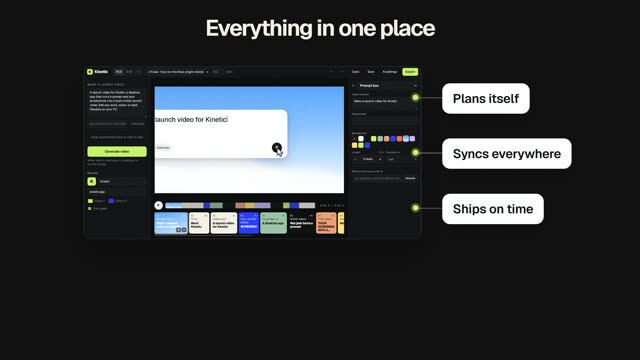
Your homepage already says what the product is, who it's for and why it matters. Paste the URL into Kinetic and it uses that to write a launch film in your brand colours, then you add screenshots and edit any word.
Runs in Chrome, Edge and Safari on Mac, Windows, Linux and ChromeOS. Free trial: 2 AI films, 2 rewrites and 3 watermarked exports, no card. Pro is $1 a day ($24 every 24 days), down to $0.61 a day on the yearly plan; cancel anytime. Hosted AI is subject to service limits; see pricing.
What Kinetic takes from your URL
- Name and icon for the title and end card.
- Colours, so the film matches your brand.
- Headline and copy, which the writer turns into a hook, the problem, the product and a call to action.
Kinetic doesn't take screenshots of your site for you. Add your own, and it places them in phone, laptop and browser frames and animates them.
How it works
- Open Kinetic at kinetic.launchloop.tech/app and sign in with Google. Nothing to install.
- Describe what you're launching in a sentence or two, or paste your site's URL so Kinetic picks up the name, colours and copy.
- Add screenshots of the product. Kinetic places them in phone, laptop or browser frames and animates them.
- Edit like a document. Change any word, colour, scene or beat; the scene re-times itself to the music.
- Export MP4 in 16:9, 9:16 or 1:1. Rendering happens on your own computer, so nothing waits in a server queue.
Tips for a better film from a URL
- Use the page with your clearest one-line pitch, usually the homepage.
- Add 3 to 5 crisp screenshots of the moments that sell the product.
- Read the script Kinetic writes and change any line that doesn't sound like you. The timing follows.
- Export the same film in 16:9 for your site, 9:16 for Reels, Shorts and TikTok, and 1:1 for feeds.
Other tools that start from a URL
Filmagic also turns a product link into a launch video, as a monthly subscription; see Kinetic vs Filmagic. AI video agents such as Agent Opus and InVideo can start from a link too, using generated or stock footage instead of your real screens; see best AI trailer makers.
Templates to start from
Every template opens in the editor with its words, colours, music and screenshots ready to change. See all 44 templates.

Questions
Can I make a video from a website URL for free?
Yes. Kinetic is free to start: 2 AI films, no card, in your browser. Free exports carry a small watermark; Pro exports are clean.
Does it work for any website?
Kinetic reads public pages. If a page blocks it or has little text, type a sentence about the product instead; the result is the same kind of film.
Will my real product appear in the video?
Yes, when you add screenshots. Kinetic never invents product screens.
Does Kinetic work on a Mac?
Yes. Kinetic runs in the browser on Mac, Windows, Linux and ChromeOS. Use Chrome, Edge or Safari 16.4 or newer.
Is Kinetic free?
You can make and edit films for free, and your first 2 AI films are free, no card. Kinetic Pro is $1 a day ($24 every 24 days) for unlimited AI films and clean exports, or less on the 3-month, 6-month and yearly plans. Cancel anytime.
Can I use the videos commercially?
Yes. The videos you export are yours, and the built-in music is synthesised in the app, so it is licence-free. Respect the rights of any images or logos you import.
Related guides
Make yours this afternoon.
Open Kinetic in your browser, describe what you're launching, and edit the film it writes. Runs in Chrome, Edge and Safari on Mac, Windows, Linux and ChromeOS. Free trial: 2 AI films, 2 rewrites and 3 watermarked exports, no card. Pro is $1 a day ($24 every 24 days), down to $0.61 a day on the yearly plan; cancel anytime. Hosted AI is subject to service limits; see pricing. Compare plans.