Kinetic / Guides / AI product video generator
An AI product video generator that shows your real product.
Most AI product video generators are built for physical products: they turn a photo of a shoe into a spinning clip. Software is different. People need to see your actual interface, so Kinetic animates your real screenshots instead of inventing a UI, and writes the story around them.
Runs in Chrome, Edge and Safari on Mac, Windows, Linux and ChromeOS. Free trial: 2 AI films, 2 rewrites and 3 watermarked exports, no card. Pro is $24 for 24 days, or from $18.50 a month on the longer plans; cancel anytime. Hosted AI is subject to service limits; see pricing.
Why generated footage doesn't work for software
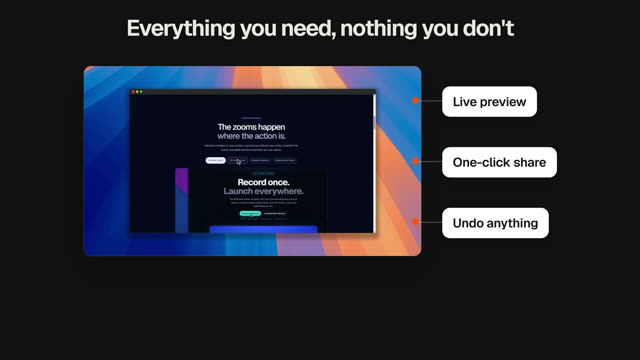
Text-to-video models such as Runway, Veo and Sora are great at mood and cinematic shots, but they redraw interfaces: buttons move, text turns to gibberish, and the flow no longer matches your product. For a SaaS or app video, viewers want to see the real screens. Kinetic keeps your screenshots as they are and animates around them: frames, zooms, cursor clicks, callouts and captions.
What the AI does
- Writes the script from one sentence or your website URL: hook, problem, product, proof and call to action.
- Picks the scenes: phone, laptop and browser frames, UI close-ups, stats that count up, before and after wipes.
- Draws product screens in your brand colour when you don't have screenshots yet.
- Scores it with licence-free music and cuts every scene on the beat.
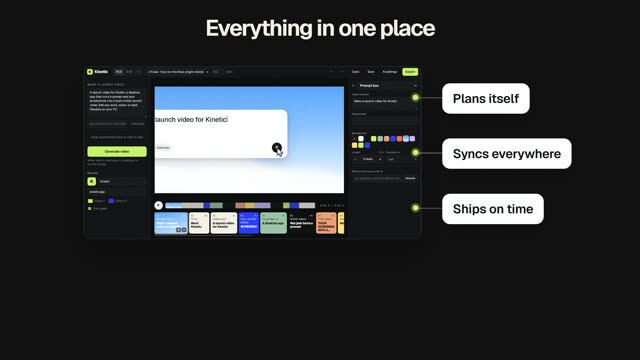
- Leaves it editable: change any word, colour, scene or timing afterwards, like a document.
How to generate a product video
- Open Kinetic at kinetic.launchloop.tech/app and sign in with Google. Nothing to install.
- Describe what you're launching in a sentence or two, or paste your site's URL so Kinetic picks up the name, colours and copy.
- Add screenshots of the product. Kinetic places them in phone, laptop or browser frames and animates them.
- Edit like a document. Change any word, colour, scene or beat; the scene re-times itself to the music.
- Export MP4 in 16:9, 9:16 or 1:1. Rendering happens on your own computer, so nothing waits in a server queue.
Unlimited videos, no credits
Many AI video tools charge credits per video. Kinetic renders on your own computer, in the browser, so Pro includes unlimited AI films and exports with no credits to count, subject to fair-use service limits. The free trial gives you 2 AI films to try it.
Templates to start from
Every template opens in the editor with its words, colours, music and screenshots ready to change. See all 44 templates.

Questions
Can it make a video for a physical product?
Kinetic is built for software, apps and digital products. For a physical product, a photo-to-video tool is a better fit, though Kinetic can still make a kinetic-typography ad around your product photos.
Does it record my screen?
No. It animates screenshots you add, or screens the AI draws in your brand colour. Use a screen recorder for a live walkthrough.
Can I add a voiceover?
Kinetic films are designed to read with the sound off, with music timed to the cuts. You can add a voiceover in any video editor after exporting.
Does Kinetic work on a Mac?
Yes. Kinetic runs in the browser on Mac, Windows, Linux and ChromeOS. Use Chrome, Edge or Safari 16.4 or newer.
Is Kinetic free?
You can make and edit films for free, and your first 2 AI films are free, no card. Kinetic Pro is $24 for 24 days for unlimited AI films and clean exports, or less on the 3-month, 6-month and yearly plans. Cancel anytime.
Can I use the videos commercially?
Yes. The videos you export are yours, and the built-in music is synthesised in the app, so it is licence-free. Respect the rights of any images or logos you import.
Make yours this afternoon.
Open Kinetic in your browser, describe what you're launching, and edit the film it writes. Runs in Chrome, Edge and Safari on Mac, Windows, Linux and ChromeOS. Free trial: 2 AI films, 2 rewrites and 3 watermarked exports, no card. Pro is $24 for 24 days, or from $18.50 a month on the longer plans; cancel anytime. Hosted AI is subject to service limits; see pricing. Compare plans.